QuikStor Keypad Installation Instructions
QuikStor Recommends the Following Wire:
- 18/2 for all 12VDC, Relay, and Bypass wiring
- 18/2 OAS (shielded) for intercoms
- 12 AWG insulated wire for grounding (stranded, not solid)
- Cat5e/6 Ethernet cable for all data transmissions
- RG-59 (analog keypad cameras under 700ft)
- RG-6 (analog keypad cameras above 700ft)
NOTE: You will need a network router or managed hub with an available port for each keypad. QuikStor does not recommend un-managed hubs or “dumb” switches.
If you are installing a keypad system with WiFi data communication, disregard the Ethernet Data Cable in this document.
*** Important!
For a reliable and stable WiFi data connection the Access Point must be installed "Line Of Sight" to the Infinity keypad(s).
Wiring Requirements
- 12 VDC runs should be no longer than 200ft (please note that the keypad needs a minimum of 11.70 volts DC in order to operate at an optimum service level)
- Ethernet Data Cable runs over 250ft will require the use of signal boosters to ensure proper signal strength is met, due to the 300ft Ethernet limit.
- Earth Ground wiring – grounding is most effective at short distances as electricity travels to the point of least resistance. All grounding locations should be 6’ or less from the keypad.
- Splices made on 18/2 should always be done with wire nuts or using a suitable termination/ splice block.
- Any splices made in underground junction boxes or in an area where water or other foreign materials could short the wires, they must have a wire nut (or similar connector) filled with silicone or like material BNC coax crimps should be used at all terminations and splice points when working with video coax.
- BNC couplers should be used at all splice locations when working with video coax (it is recommended that you wrap the splice with electrical tape to avoid grounding the video signal)
Pre-Installation Tips
- Check the gate motor for a 120v outlet. This can provide you with an excellent local source of power for your keypads and prevents severe voltage drop issues) Confirm that the power outlet has a constant-hot connection and is not on a timer or photocell device.
- Plan on running a couple of spares of each type of wire. This can help in case you forgot something or need it for future add-ons to the system.
- Keypads should be on their own individual QuikStor provided power supplies. QuikStor does not recommend shared power panels.
- QuikStor recommends a switch that bypasses the keypad system in the event that the gate needs to be held open for an extended length of time. Please keep this in mind when you are planning your wire pulls. An extra 18/2 cable between the office bypass switch and gate motor will be needed.
- If using QuikStor Express management software, please make sure your client has installed the QuikStor Express software and data entry has been completed before you head out to complete the installation.
- Make sure all conduit is complete before starting the job.
- Verify that all conduits follow a logical pattern as suggested by the QuikStor typical conduit layout drawing included below.
(Note that the QuikStor typical conduit layout drawing is merely a suggested guideline and can be deviated from or done in other ways based on your own personal experience. In no way does QuikStor accept any liabilities for mishandled conduit runs, improper conduit sizes, improper interpretations, or misused guidelines based on this layout.)
By following these suggestions you should be well on your way to a quick and easy installation of your new QuikStor access control products.
Conduit Requirements
- A minimum of one ¾” to 1” conduit is needed from the office management area to the gate operator, junction box, or Christie™ box.
- A minimum of one ¾” conduit to each keypad stubbed up approximately a foot above grade is needed.
- A minimum of one ¾” conduit is needed from the junction box or Christie box to the gate motor for the relay control wires if your layout does not allow stubbing up next to the gate motor.
Note: If the keypads have cameras it is necessary to use 1’ conduit or larger for the main run from the office.
Installation tip!
It is always a good idea to label your wires with a Sharpie™ or wire markers! This will assist you during the installation and helps you or others later during service.
Wire Pulls
Pull the main wire run leaving enough slack to splice wires properly. The main run usually consists of the following wire:
Typical two keypad wired system with intercoms:
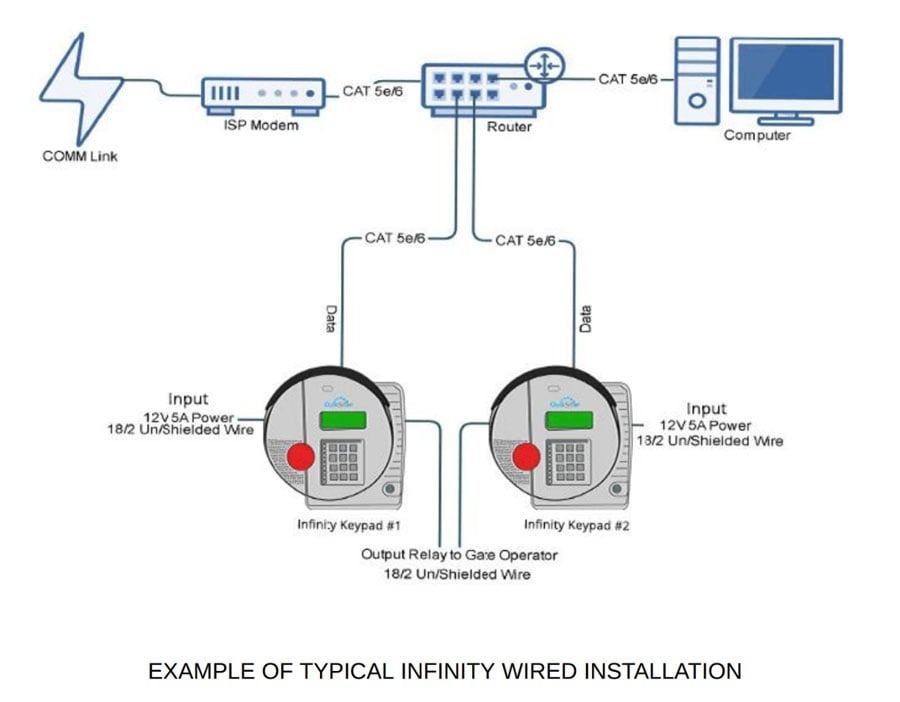
- Ethernet for data communications. Each keypad will need a dedicated Ethernet cable to the nearest managed Ethernet switch. A single Ethernet cable may be used for wiring between switches.
- One 18/2 for 12 VDC for each keypad (this is if you have not chosen to power keypads locally from the gate motor)
- One 18/2 OAS Shielded for intercoms to each keypad (Must be home run back to the office base station!)
- One 18/2 for bypass or gate over ride directly to gate motor terminals One or two spare 18/2 OAS Shielded for future use
- One or two spare Ethernet for future use
An additional 18/2 for power and RG-59/RG-6 for analog video data will be needed for keypads with analog cameras.
Pull keypad runs leaving at least 5’ of extra wire from the finished grade to thread through the gooseneck.